
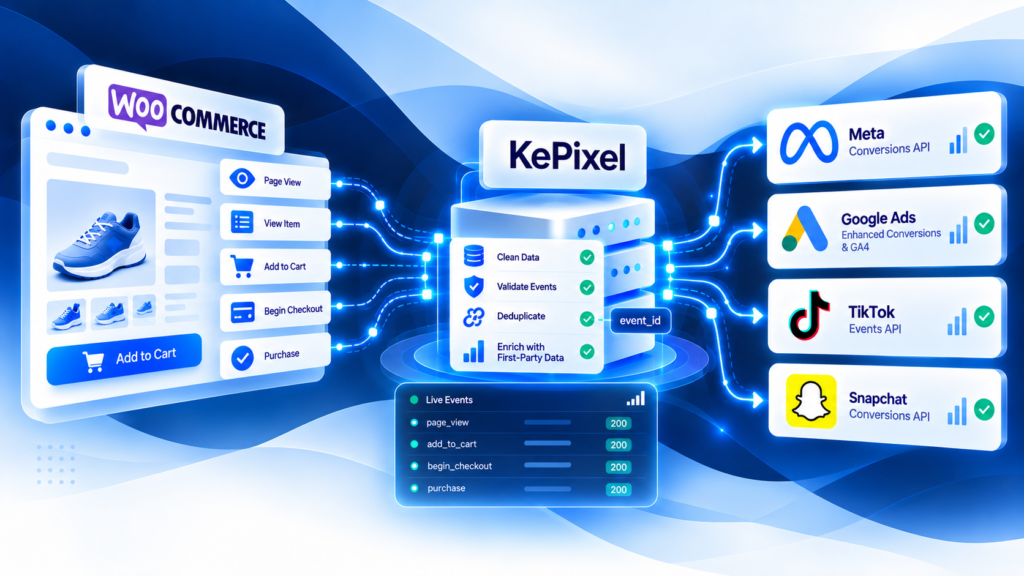
WooCommerce server-side tracking should begin with the WooCommerce order lifecycle and a clear Purchase owner, not with another plugin.
WooCommerce stores are flexible, which also means they often accumulate several measurement paths: Meta plugins, Google or GA4 integrations, GTM, custom theme code, checkout extensions, CAPI plugins, and server workflows. The first job is to make one order equal one logical Purchase across that stack.
Define when Purchase is valid in WooCommerce
WooCommerce orders move through states such as pending payment, processing, completed, on hold, cancelled, and refunded.
Those states do not all mean the same thing.
For many paid physical-product orders, processing indicates payment has been received and fulfillment is still pending. completed represents a later fulfillment state. Other payment methods can use different paths.
Your measurement rule should define which business moment counts as Purchase for the store rather than firing from whichever hook is easiest to reach.
Map every system that can send Purchase
Before adding server-side delivery, document every current sender:
- WooCommerce or channel plugins;
- GTM/browser tags;
- Meta integrations;
- Google/GA4 integrations;
- custom code;
- payment or checkout extensions;
- CAPI/server plugins;
- webhooks or backend services.
One store order can otherwise become several unrelated conversion events.
Separate transaction ID from logical event identity
The WooCommerce order ID or another stable transaction identifier is useful for reconciliation.
When the same Purchase is delivered through browser and server paths, the measurement architecture also needs a consistent logical event identity for duplicate control.
Do not generate a new event identity every time a thank-you page reloads or a server retry runs.
Values, currency, and refunds need explicit rules
“Revenue” is not self-defining.
Document whether your Purchase value includes:
- tax;
- shipping;
- discounts;
- gross or net order value.
Keep currency explicit.
Refund behavior also needs a separate rule. A full refund, partial refund, cancellation, and failed payment are different business outcomes and should not be collapsed into one generic event.
Common WooCommerce failure modes
Thank-you page reloads create duplicate Purchase
A browser implementation that fires solely because a confirmation page loads can create duplicates if the page is revisited.
Several plugins own the same conversion
Native channel plugins and a custom GTM or server workflow can overlap without either knowing about the other.
Payment status is confused with fulfillment status
Firing Purchase only when an order becomes completed may be too late for some stores; firing at order creation may be too early when payment is not confirmed. The correct moment depends on the store's payment model.
Value definitions drift
One integration includes shipping while another does not. Event count looks healthy, but revenue comparisons remain inconsistent.
Retries create new logical events
Server delivery should be idempotent enough that a retry does not create another conversion for the same order.
WooCommerce pre-launch QA
Use a controlled set of orders and test:
- guest and logged-in checkout;
- the main card/payment gateway;
- delayed or offline payment if the store uses it;
- mobile checkout;
- coupons and discounts;
- product variations;
- payment redirects;
- thank-you-page reload;
- browser/server duplicate behavior;
- full and partial refunds where relevant.
For every test, reconcile event identity, transaction ID, value, currency, and destination receipt with the WooCommerce order.
When a larger server-side layer is useful
A managed layer becomes more valuable when:
- multiple plugins compete for ownership;
- the store needs several destination mappings;
- measurement regressions happen repeatedly;
- an agency needs consistent controls across stores;
- the team needs central logs and delivery diagnostics;
- browser and backend business events need one explicit contract.
If the existing plugins already produce stable events and the team can explain discrepancies, a larger layer may not be justified.
Current KePixel Product Truth boundary
KePixel has documented a WordPress/WooCommerce source design with event-contract and Purchase-identity concepts, but the customer runtime and broad activation are still under active implementation. This guide is educational and must not be read as a claim that general WooCommerce activation is currently available.
If you are diagnosing a real WooCommerce store, request a Tracking Health Audit first. Current implementation availability is confirmed separately.
What to read next for WooCommerce measurement
Frequently Asked Questions
Which WooCommerce order status should trigger Purchase?
There is no universal answer for every store. Define the business moment that represents a valid purchase for your payment model; WooCommerce order states such as processing and completed represent different lifecycle stages.
Can a thank-you page create duplicate Purchases?
Yes, if the implementation fires Purchase whenever the page loads and does not preserve a stable event identity.
Should transaction ID and event ID be the same thing?
They are different concepts. Transaction ID identifies the order; event identity is used to represent one logical measurement event across delivery paths.
Does KePixel currently offer general WooCommerce activation?
This article does not make that claim. The current WordPress/WooCommerce customer runtime remains under active implementation and must be verified before any implementation commitment.
What should I audit before adding another plugin?
Map every existing Purchase sender, define the Purchase lifecycle moment, test duplicates and retries, and reconcile sample events with WooCommerce orders.