
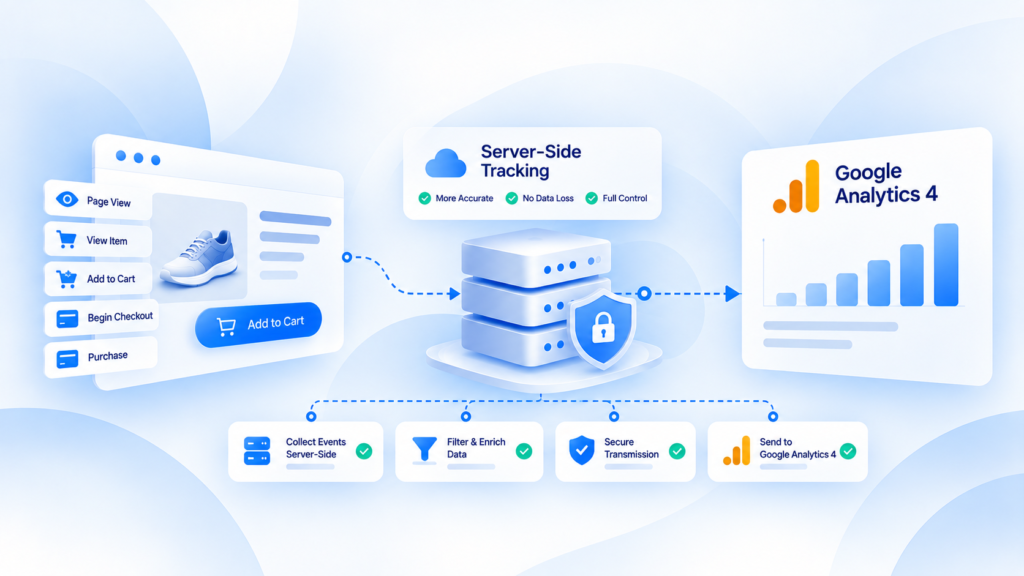
GA4 server-side tracking for ecommerce is useful when you need more control over how ecommerce events are received, validated, and forwarded—not when you simply want another copy of the same browser tags.
For ecommerce teams, the hard part is preserving the meaning of events such as view_item, add_to_cart, begin_checkout, and purchase while keeping transaction IDs, value, currency, and item data consistent across the measurement path.
What server-side tagging changes in a GA4 setup
Google's server-side tagging model adds a server container between the browser or source and downstream Google or third-party endpoints. The server container can receive event requests, apply processing rules, and then forward selected data.
That architecture can improve control and observability, but it does not create ecommerce events automatically. GA4 ecommerce events still need to be implemented with the required business context.
The useful question is therefore: where should the ecommerce event be created, and what should the server layer be responsible for?
Keep ecommerce semantics stable before changing transport
A purchase event is only useful when it represents the same business outcome every time.
Before moving delivery server-side, define:
- when Purchase becomes valid in the commerce system;
- which transaction ID represents the order;
- which revenue definition is sent;
- how tax, shipping, discounts, and currency are handled;
- how item IDs and quantities are represented;
- how refunds are measured separately;
- which system is the source of truth for reconciliation.
Transport should not be used to hide an undefined event contract.
The ecommerce event flow to audit
A healthy GA4 ecommerce path can be reviewed in four layers.
1. Collection
Did the expected ecommerce action occur and produce the right event?
For example, a Purchase should come from a real completed business outcome, not simply from a generic page view that happens to occur after checkout.
2. Payload quality
Check the fields that give the event meaning:
- transaction ID;
- value;
- currency;
- item identifiers;
- item quantity and price where used;
- campaign/session context when available and appropriate.
3. Server processing
If a server container is involved, confirm what it changes.
The layer may validate, normalize, filter, or route data. Every transformation should be intentional and testable. A server should not silently change the meaning of the ecommerce event.
4. GA4 receipt and reporting
Confirm the event reaches GA4 and appears with the expected parameters. Then separate collection problems from reporting interpretation.
A Purchase can be collected correctly while a report still differs from store accounting because the two systems answer different questions.
Common GA4 ecommerce failure modes
Duplicate purchases
Duplicates often appear when several tools send the same order or when a confirmation flow can fire repeatedly.
Use the transaction ID and your event-owner map to diagnose which systems produced the duplicates. Do not assume moving the tag to a server automatically fixes them.
Missing item data
A Purchase may reach GA4 while its item array is incomplete or inconsistent. That can make product-level reports less useful even when event counts look normal.
Value and currency mismatches
A correct event name with the wrong value is still bad measurement.
Reconcile sampled transactions against the store and document exactly which revenue definition GA4 receives.
Checkout path gaps
Payment redirects, accelerated checkout, mobile flows, or consent state changes can create gaps between browser behavior and the final business outcome. Trace those paths separately rather than assuming one successful test represents every checkout route.
Server-side tagging is not the same as Measurement Protocol
These concepts can be part of the same architecture, but they solve different implementation problems.
A Tag Manager server container is an intermediary processing environment. GA4 Measurement Protocol is a way to send events to Google Analytics over HTTP from a compatible source. A team can use one, both, or neither depending on the architecture.
The design should start from event ownership and data quality—not from a requirement to use a particular tool.
How to validate an ecommerce migration
Use a small set of known transactions and compare before and after.
For each order, verify:
- the source transaction exists;
- Purchase fires once according to your event contract;
- transaction ID is stable;
- value and currency match the intended definition;
- item data is present where required;
- the server layer receives and forwards the event as intended;
- GA4 receives the expected event;
- reporting differences can be explained without inventing missing data.
Do this across more than one checkout path.
Diagnostics for ecommerce event-flow failures
If your problem spans several platforms rather than GA4 alone, use the ecommerce conversion tracking checklist.
If duplicate event ownership is the main problem, the server-side tracking implementation checklist helps structure the rollout controls.
When the failure point spans multiple layers
A Tracking Health Audit is appropriate when you cannot tell whether the discrepancy begins in the store, browser collection, server processing, or GA4 reporting.
Request a Tracking Health Audit to map the event path first. This is a diagnostic CTA; it does not imply that a specific GA4 integration path is currently available in KePixel.
Frequently Asked Questions
Does GA4 server-side tracking create ecommerce events automatically?
No. Ecommerce events still need to be created with the correct business context. The server layer changes processing and delivery, not the underlying transaction truth.
What is the most important field for Purchase reconciliation?
A stable transaction ID is central because it lets you compare GA4 Purchase events with source orders and investigate duplicates.
Can server-side tagging fix duplicate purchases by itself?
No. Duplicate control still depends on event ownership, firing rules, transaction identity, and the systems sending the event.
Should GA4 revenue always equal store revenue?
Not necessarily. First confirm raw event integrity and the revenue definition being sent; reporting scope and business accounting can differ.
What should I test after a server-side migration?
Test real or controlled purchases across checkout paths, then verify event count, transaction ID, value, currency, items, server processing, and GA4 receipt.