
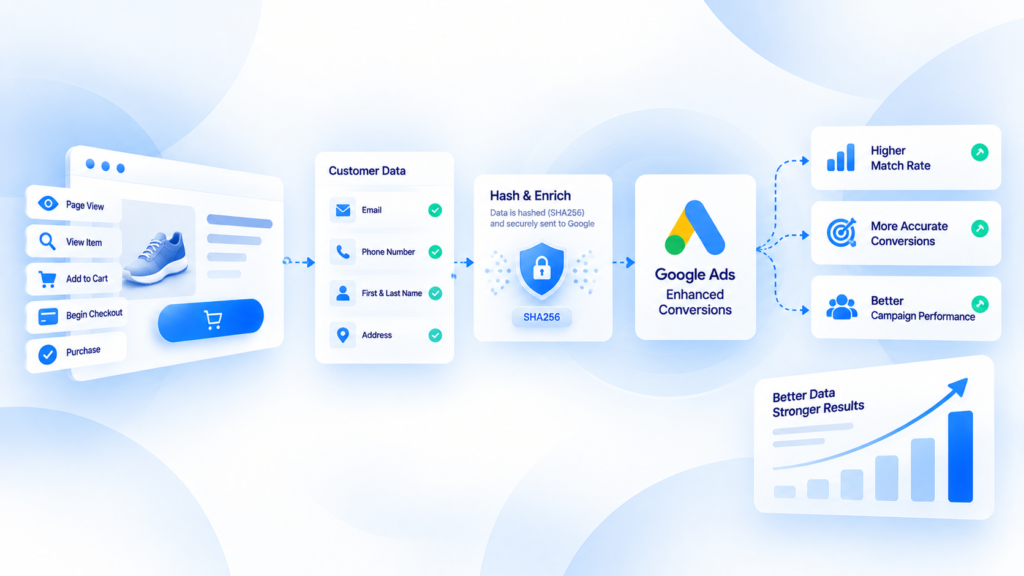
Google Ads enhanced conversions supplement an existing conversion setup by sending hashed first-party customer data to Google when a conversion happens.
They are not a replacement for the conversion action itself, and they do not repair a Purchase or Lead event that fires at the wrong time, uses the wrong value, or never happens.
What enhanced conversions actually add
The feature uses first-party customer information collected during a conversion, such as email address or phone number when available and permitted, and sends that information in a protected hashed form for matching.
The goal is to improve conversion measurement by giving Google additional first-party signals that can be associated with an ad interaction.
That makes enhanced conversions an identity and measurement enhancement, not a general server-side tracking architecture.
Enhanced conversions do not replace your base conversion
Start with the underlying conversion action.
For ecommerce, that usually means making sure a real Purchase is measured with the correct trigger, value, currency, and transaction identity.
For lead generation, it means defining what qualifies as the conversion and how that lead is represented.
If the base conversion is wrong, enhanced conversions can add matching data to a bad event. That does not make the event trustworthy.
What data can be used
Google documents enhanced conversions around first-party, user-provided information available during a conversion. Depending on the implementation, that can include fields such as:
- email address;
- phone number;
- name and address information where applicable.
The data needs to follow Google's current formatting, hashing, policy, and consent requirements.
Do not invent values, scrape unrelated data, or send fields simply because they exist somewhere in the customer record.
Enhanced conversions vs ordinary Google Ads conversion tracking
Standard conversion tracking tells Google that a defined conversion occurred.
Enhanced conversions add eligible first-party information to help with matching and measurement.
The two layers should be debugged separately:
- Conversion event health: did the right conversion happen once with the correct value?
- Enhanced conversion data health: was eligible customer information available, formatted correctly, and accepted?
This separation prevents teams from treating an enhanced-conversions diagnostic as proof that the core Purchase setup is correct.
Enhanced conversions vs server-side tagging
Server-side tagging is an architecture for routing and processing event data through a server container or controlled endpoint.
Enhanced conversions are a Google Ads measurement feature.
They can be used in implementations that involve server-side infrastructure, but they are not synonyms. A business can use enhanced conversions without adopting a broad multi-platform server-side stack.
Common implementation mistakes
Turning the feature on before the base conversion is stable
If Purchase fires twice or reports the wrong value, solve that first.
Capturing user-provided data at the wrong moment
The implementation should use information actually available when the conversion occurs and follow Google's current policies. A field existing elsewhere in the account does not automatically make it appropriate to send.
Assuming hashing removes all privacy responsibilities
Hashing is part of the data handling process, not a substitute for consent, policy compliance, or a legitimate collection flow.
Measuring success only by a setup-status badge
A configuration can appear active while the underlying conversion event is incomplete. Compare real business outcomes and conversion diagnostics rather than trusting one status indicator.
Using enhanced conversions to explain attribution differences
Better matching can affect measurement, but attribution and business accounting still answer different questions. Do not expect every platform total to equal store revenue.
A practical validation workflow
For an ecommerce Purchase:
- choose a real or controlled order;
- confirm the base Google Ads conversion fires once;
- verify value and currency;
- verify the transaction ID strategy;
- confirm eligible user-provided data is available at the conversion moment;
- review enhanced-conversions diagnostics in Google Ads;
- test more than one checkout path;
- compare results over enough volume to avoid judging the setup from one event.
If the conversion itself is missing or duplicated, use the ecommerce conversion tracking checklist before tuning matching signals.
What to diagnose before changing the implementation
This article is educational about Google Ads. It does not claim that a specific Enhanced Conversions workflow is generally available in KePixel today.
If you are unsure whether the issue is the base conversion, duplicate delivery, identifier continuity, or platform diagnostics, request a Tracking Health Audit. Current integration availability is confirmed separately before implementation.
Frequently Asked Questions
What are Google Ads enhanced conversions?
They supplement an existing conversion setup with eligible hashed first-party customer data to improve conversion measurement and matching.
Do enhanced conversions replace the Google Ads conversion tag?
No. They enhance a conversion setup; the underlying conversion action still needs to be implemented correctly.
Is hashing enough for privacy compliance?
No. Hashing does not remove the need to follow Google's policies, applicable consent requirements, and your own lawful data-collection practices.
Are enhanced conversions the same as server-side tagging?
No. Enhanced conversions are a Google Ads feature; server-side tagging is a broader event-processing and delivery architecture.
What should I fix first if Purchase is duplicated?
Fix event ownership and duplicate conversion firing first, then validate enhanced-conversion data on top of the stable conversion.