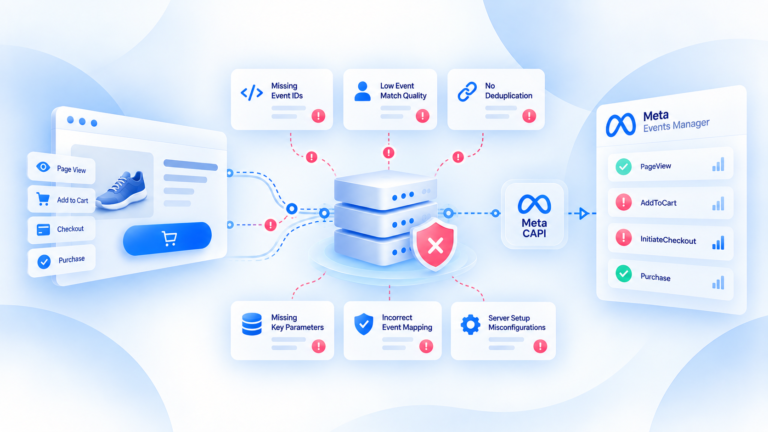
Server events missing from Meta usually means something broke before, during, or after delivery — not that Meta simply “lost” the conversion.
The quickest way to diagnose it is to follow one real purchase from the source to the destination. First confirm the purchase event was actually created. Then inspect the payload, server-side processing, delivery result, and browser/server matching. If you skip the source and start inside the platform, you can spend time debugging the wrong layer.
Confirm whether the purchase event was created at the source
Start with the transaction you know happened.
Open the store, backend, order system, or other source of truth and confirm the purchase exists there.
Then ask whether the tracking implementation created the event that was supposed to represent that transaction.
This sounds obvious, but it is the most important check in the whole process.
A server-side workflow cannot deliver an event that never entered the tracking system.
If the order exists but no purchase event was created, the problem is upstream.
If the event was created but disappeared later, then you can move down the path and inspect processing and delivery.
For one order, note the details you will need later:
- order or transaction ID;
- event timestamp;
- purchase value;
- currency;
- event ID if one exists;
- the source that created the event.
The goal is to build a traceable reference point.
Do not start with a dashboard total.
Start with one real order and one expected event.
Check the event payload before blaming the destination
Once you know the source event exists, inspect what the event actually contains.
A request can be delivered successfully and still carry poor data.
Likewise, a destination can reject or fail to process an event because the payload does not meet the current implementation requirements.
The exact Meta-specific required fields should be verified against Meta's current official documentation before any implementation change.
At the diagnostic level, check the parts of the event your own tracking stack should already understand.
Event name
Make sure the event represents the action you think it represents.
A purchase should not be accidentally mapped as a different event because a naming rule or transformation changed upstream.
Also check that browser and server paths are not using conflicting definitions for what should be the same business action.
A naming mismatch can create confusing diagnostics even when both requests technically leave the system.
Timestamp
Check when the source transaction happened and when the server event was created or sent.
The timestamp helps you trace the event through logs and delivery records.
A timing difference does not automatically mean the event is invalid.
But if the event timestamp is missing, obviously wrong, or disconnected from the source transaction, it becomes harder to prove that you are tracing the correct purchase.
Do not apply a universal platform timing rule unless it has been verified from current official documentation.
Value and currency
Compare the event value and currency with the actual order.
A purchase event that says the wrong amount is still bad tracking data even if Meta receives it.
Look for issues such as:
- value missing;
- wrong currency;
- value copied from a cart before the final order changed;
- formatting or mapping errors;
- server and browser events using different values for the same purchase.
The source transaction should remain the reference point.
Identifiers
Review the identifiers used to connect the technical event to the real transaction.
That can include an event or order identifier and any other identifiers permitted and relevant to the verified workflow.
The purpose is not to send every identifier available.
The purpose is to make the event traceable and correctly processed.
If the same purchase is represented in both browser and server paths, identifier consistency also matters for matching and deduplication.
Check whether event delivery failed
If the source event and payload look correct, follow the event into the server-side delivery layer.
Now the question changes.
It is no longer:
“Did the purchase happen?”
It becomes:
“Did the event leave our tracking system successfully?”
Inspect the evidence available in your implementation.
Depending on the setup, that may include processing logs, delivery status, response codes, error states, or destination diagnostics.
You are looking for the point where the event stopped moving.
A useful sequence is:
source event → server processing → outgoing request → destination outcome
If the source event exists but there is no outgoing request, the problem is likely in mapping, processing, routing, or server-side logic.
If an outgoing request exists but returns a failure, investigate the request and the destination-specific requirement involved.
If the request appears successful but you cannot find the expected result at the destination, do not immediately resend the event.
First verify that you are looking at the correct transaction, time range, event representation, and diagnostic surface.
Blind retries can create a duplication problem on top of the original delivery problem.
This is why delivery validation should be part of the implementation rather than something a team does only after numbers look wrong.
Check browser/server deduplication and matching
A server event can appear “missing” in a reporting view even when transport is not the real problem.
Browser and server matching can affect how overlapping representations are processed or displayed.
That is why deduplication needs to be diagnosed separately from delivery.
Take the same source order and compare the browser and server representations.
Check:
- event or order IDs;
- event name;
- value;
- currency;
- timestamps;
- whether both paths represent the same transaction.
If both paths send the same purchase, they need coordinated event identity according to the destination's verified requirements.
If the two events use unrelated identifiers or different event definitions, matching can fail.
On the other hand, if one event is being handled as an overlapping representation of another, you should not automatically interpret the absence of two separate counted conversions as a transport failure.
The key distinction is:
Transport asks whether the event arrived. Deduplication asks whether overlapping events represent one conversion or more than one.
Those are different diagnostic questions.
Do not fix a deduplication issue by repeatedly resending events.
And do not fix a true delivery failure by disabling deduplication.
Trace the two stages separately.
When the problem needs a full tracking audit
A single failed event can often be diagnosed by following the event path.
A persistent pattern is different.
A broader Tracking Health Audit is justified when:
- important purchase events keep disappearing;
- the same issue affects multiple orders;
- browser and server paths disagree consistently;
- delivery status is unclear or unreliable;
- values or identifiers are inconsistent;
- duplicates and missing events appear at the same time;
- the team cannot identify whether the failure sits at the source, server, or destination.
At that point, debugging one event at a time may not show the underlying architecture problem.
The audit should work from source-of-truth transactions outward.
That means checking whether the events exist, whether they are accurate, how they move through browser and server paths, whether they are deduplicated correctly, and whether delivery outcomes can be explained.
The goal is not to prove that “Meta is wrong” or “the server is broken.”
The goal is to identify the exact layer where trustworthy conversion data stops being trustworthy.
Related guides
Frequently Asked Questions
Was the source purchase event created?
Check this first; downstream delivery cannot repair an event that never existed.
Which fields should be checked?
Event definition, value/currency, event ID and relevant identifiers; Meta-specific requirements need official verification.
How do you separate source failure from delivery failure?
Confirm the source event, then inspect server processing and outgoing delivery status.
Can deduplication make an event look missing?
It can affect reporting visibility, but deduplication and transport failure are separate diagnostic stages.
When is a full audit justified?
When important missing events persist or the failure point cannot be isolated across source, server and destination.