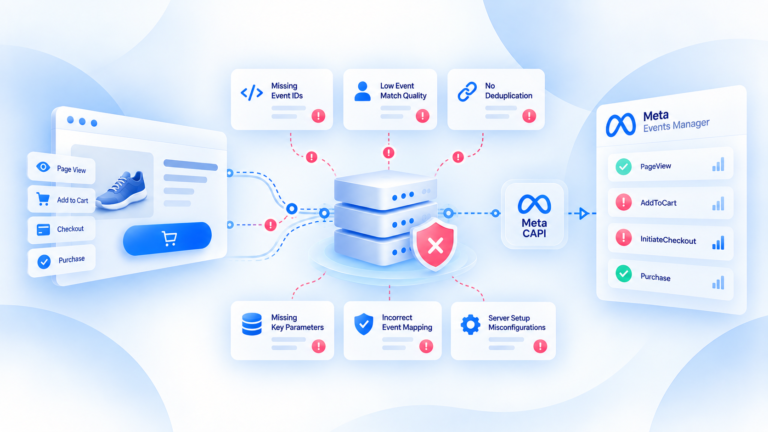
A conversion API gives a business a server-side way to send conversion events to a supported advertising or analytics platform.
In practice, the flow is straightforward: a supported source creates a real event, the server-side layer validates and prepares that event, and then the event is sent to a verified platform API endpoint. The API handles delivery to the destination; the wider tracking architecture handles the work around collection, data quality, identifiers, deduplication, and monitoring.
What a Conversion API actually does
A Conversion API is part of the delivery layer.
Its job is to let a source or server-side system send conversion data directly to a platform endpoint instead of depending only on a browser request.
That does not mean the API creates the conversion.
The business event has to exist first.
A customer completes an order. A backend confirms the transaction. A supported source produces the event data. Only then can the delivery workflow prepare that information for the destination.
This distinction matters because API delivery can be technically successful while the underlying event is still wrong.
If the purchase value is incorrect at the source, the API can deliver the wrong value perfectly.
If the same order is represented twice, the API can deliver both copies unless the implementation includes the right deduplication logic.
A Conversion API is therefore not a replacement for event design or data quality.
It is the mechanism that moves a prepared conversion event into a destination-specific server-side workflow.
How a conversion moves from your store to an advertising platform
The easiest way to understand server-side event delivery is to follow one order.
A shopper completes a purchase in the store.
That transaction becomes the source of a conversion event.
From there, the event moves through several stages before the advertising platform can use it.
Event created
First, the business event has to exist.
The source might be an ecommerce platform, backend, application, or another supported system.
The event should represent something real and measurable, such as a completed purchase.
At this stage, the priority is source accuracy.
If the source creates the wrong event name, wrong value, or duplicate event, the rest of the delivery path inherits that problem.
Data prepared
Before delivery, the event may need to be normalized and mapped into the structure expected by the destination.
That can include checking:
- the event name;
- value and currency;
- event or order ID;
- relevant permitted identifiers;
- whether the event overlaps with a browser-side version of the same conversion.
This preparation step is where a controlled server-side workflow becomes useful.
Instead of treating every platform as a completely separate tracking implementation, the business can start from a defined event and then prepare it for a supported destination.
API delivery
Once the event is ready, it is sent to the destination's verified API endpoint.
This is the part people usually mean when they say "Conversion API."
But the request itself is only one step.
The implementation still needs to know whether the request succeeded, whether the destination accepted the event, and whether the data inside the request was useful.
A successful network request is not the same thing as a trustworthy conversion signal.
Platform receipt
The final stage is confirming what happened at the destination.
Did the platform receive the event?
Did it process it?
Was the event rejected or flagged?
Does the conversion reconcile with the original order?
The exact diagnostic tools and fields vary by destination, so they should be verified against the current platform implementation.
The principle stays the same: event delivery should be observable enough that a team can tell where a failure happened.
What data a server-side conversion event may contain
There is no single universal payload that every platform expects.
Different destinations use different schemas and requirements.
At a high level, a conversion event often needs enough information to describe the business action and help the destination process it correctly.
That can include:
- an event name;
- a timestamp or event timing information;
- purchase value;
- currency;
- event or order identifiers;
- permitted customer or click identifiers where required and available;
- other destination-specific fields.
The important rule is not to send every field you can find.
The important rule is to send the fields that are required, permitted, and useful for the verified workflow.
Identifiers deserve particular attention.
A stable event ID can help coordinate browser and server representations of the same business event when both paths are active.
Values and currency matter because a purchase event with the wrong monetary data is still poor tracking, even if it reaches the platform successfully.
The exact field list should always be checked against the destination's current requirements rather than copied from another integration.
Conversion API vs the wider server-side tracking architecture
A Conversion API and server-side tracking are related, but they are not the same thing.
The Conversion API is the destination-facing delivery mechanism.
Server-side tracking is the broader architecture around the event.
That broader architecture can include:
- collecting the event from a supported source;
- validating the event;
- normalizing values and fields;
- handling identifiers;
- coordinating browser and server events;
- applying deduplication;
- routing the event;
- monitoring delivery;
- diagnosing failures.
Think of the API as the final delivery road.
The tracking architecture is the system that decides what should enter that road, whether the data is ready, and what to do if something goes wrong.
This is why "we have a CAPI integration" is not enough to prove the tracking setup is healthy.
A team still needs to know whether the source event is correct, whether duplicate events are controlled, whether delivery is reliable, and whether destination data reconciles with the underlying transaction.
How to verify whether events are actually being delivered
Do not validate a Conversion API integration by checking only that an API request returned successfully.
Start from the transaction.
Take a real source-of-truth order and follow the corresponding event through the delivery path.
Check four things.
First, did the source create the expected event?
Second, did the server-side workflow prepare and send the correct data?
Third, did the destination receive or process the event according to its available diagnostic view?
Fourth, does the event still reconcile with the original order?
For a purchase, that means checking details such as:
- order or event ID;
- value;
- currency;
- duplicate representations;
- delivery status;
- destination outcome.
If the source event never existed, the problem is upstream.
If the event exists but never leaves the server-side workflow, the problem is in processing or delivery.
If it is sent but the destination does not accept it, the destination-specific implementation needs investigation.
And if the event arrives but the numbers are still different, the next question may be attribution or reporting rather than transport.
That is the practical value of treating Conversion API as part of an observable event path instead of a one-time integration task.
Related guides
Frequently Asked Questions
How does a Conversion API send a conversion without browser-only dependency?
A supported source event is mapped, validated and sent server-side to a verified platform API endpoint.
What happens before an event reaches the platform?
It may be normalized, mapped, checked for required values/identifiers and prepared for deduplication.
What can a server-side conversion event contain?
Event name, values, IDs and relevant identifiers; exact required fields are destination-specific.
Is Conversion API the same as server-side tracking?
No; CAPI is a destination delivery mechanism, while server-side tracking is the broader processing architecture.
How do you verify event delivery?
Validate the source event, outgoing delivery, destination receipt and reconciliation with source-of-truth orders.