
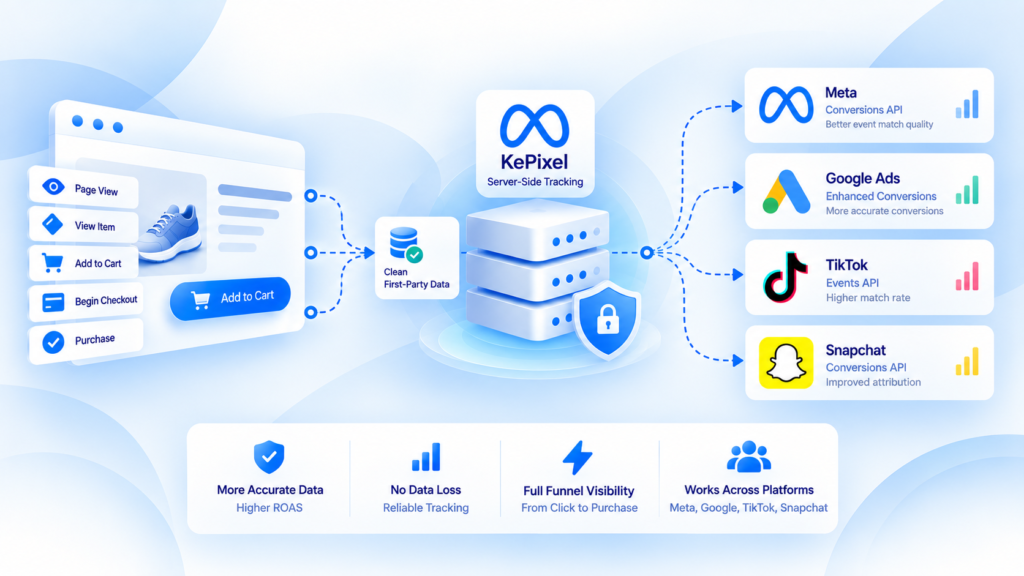
Server-side tracking for Meta, Google, TikTok, and Snapchat should be designed as a shared measurement architecture with destination-specific rules—not as one generic payload copied to four platforms.
The useful pattern is to start from a trustworthy business event, normalize what is common, and then map only the fields and delivery behavior required by each destination.
One event model does not mean one identical payload
A Purchase has business facts that should stay stable across destinations:
- one real order happened;
- a transaction or order identifier exists;
- value and currency have a defined meaning;
- items may be available;
- the event occurred at a particular time.
Platforms can still require different schemas, identifiers, consent handling, APIs, diagnostics, and deduplication behavior.
The architecture should separate business truth from destination mapping.
Start with a canonical business event
Before thinking about Meta, Google, TikTok, or Snapchat, define what the event means inside the business.
For Purchase, document:
- the source system;
- the moment Purchase becomes valid;
- transaction identity;
- value and currency rules;
- refund behavior;
- which customer/click/browser identifiers are legitimately available;
- who owns retries and idempotency.
Then map that event outward.
This prevents the four destinations from becoming four different definitions of the same conversion.
Destination-specific concerns still matter
Meta
Meta measurement commonly involves browser Pixel and server-side event delivery. When the same conversion travels through both paths, duplicate control and event identity need deliberate testing.
“Google” is not one destination. GA4 ecommerce measurement, Google Ads conversion tracking, and enhanced conversions have different jobs. Keep analytics events, Ads conversion actions, and user-provided data requirements conceptually separate.
TikTok and Snapchat
Both platforms have their own server-event products, schemas, diagnostics, and policy requirements. Treat them as destination-specific implementations rather than assuming a Meta-style payload can be copied unchanged.
This article does not claim that KePixel currently supports every destination listed here. It explains the architecture teams need when they evaluate multi-platform server-side measurement.
The routing layer should be observable
When several destinations are involved, the system should make it possible to answer:
- Did the source create the event?
- Did the routing layer accept it?
- Which destinations were eligible to receive it?
- What mapping was applied?
- Did delivery succeed or fail?
- Was a retry attempted?
- Can the outgoing event be traced back to the original order?
Without observability, multi-platform delivery becomes difficult to debug because each dashboard shows only part of the journey.
Do not use one platform's dashboard as store truth
A destination reports conversions according to its own attribution and reporting model.
The commerce system should remain the baseline for actual orders. Platform data is used to understand measurement and attribution, not to redefine whether the order existed.
That separation is especially important when comparing several ad platforms at once.
Common multi-platform failure modes
Different values for the same order
One destination receives gross revenue, another receives net revenue, and a third excludes shipping. The event count may match while revenue comparisons remain confusing.
Duplicate senders
Native integrations, plugins, GTM, and custom server workflows can overlap. One platform may receive the same Purchase several times even when the others are healthy.
Identifier continuity gaps
Click or browser identifiers may be available early in the journey and lost before the backend creates the final conversion event.
Destination mapping drift
A change made for one platform can silently alter event names or field mappings for another when the routing layer lacks clear boundaries.
A safer multi-destination rollout
- define the canonical business event;
- choose one destination to validate first;
- reconcile received events with source orders;
- verify destination-specific identity and duplicate rules;
- add the next destination without changing the business event definition;
- monitor failures separately by destination;
- keep a rollback path for each integration.
Do not launch four new server destinations at once and then debug them from aggregate dashboards.
Internal links for diagnosis
For Meta duplicate issues, use Meta CAPI deduplication.
For broad store-vs-platform discrepancies, use the ecommerce conversion tracking checklist.
Before adding another destination
A Tracking Health Audit is the current verified diagnostic offer for mapping event ownership, routing, missing or duplicate events, and unexplained measurement discrepancies. Specific source and destination availability must still be verified before implementation.
If the stack has several unexplained failure points, request a Tracking Health Audit before adding another destination.
Frequently Asked Questions
Can one server-side event be sent identically to every ad platform?
Not safely as a general rule. The business event can have a shared canonical meaning, but each destination has its own schema, identifiers, diagnostics, and policies.
Should store revenue equal every platform's attributed revenue?
No. Store truth and platform attribution answer different questions. First reconcile raw event delivery, then interpret attribution.
Is multi-platform server-side tracking automatically better than native integrations?
No. It adds value when centralized control, normalization, routing, and observability solve a real problem; it also adds operational responsibility.
Does this article confirm current KePixel availability for all four destinations?
No. It is platform education. Current KePixel source and destination availability must be verified separately.
What is the safest rollout order?
Validate the business event and one destination first, then add destinations incrementally while preserving the same source-of-truth event definition.