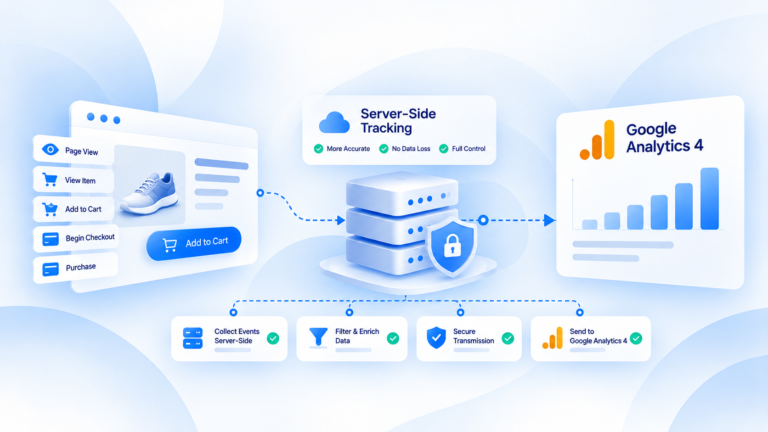
Server-side vs client-side tracking changes where event data is handled, how much depends on the browser, and where teams can control the flow.
The short answer is simple: client-side tracking does most of its work in the user's browser or device, while server-side tracking adds a controlled server layer before data reaches supported destinations. The server path can give a team more control over validation, identifiers, deduplication and routing, but it still depends on a valid source event. It is not a replacement for every browser-side function.
Where client-side and server-side tracking happen
Client-side tracking lives close to the user's interaction.
A shopper lands on a product page, clicks a button, starts checkout or completes an order. Code running in the browser can detect that action and send a request directly to an analytics or advertising platform.
That makes client-side tracking easy to understand: the event happens in the browser, and the browser handles much of the measurement work.
The trade-off is that this measurement logic runs in an environment the business does not fully control. Scripts can fail to load. Requests can be blocked. Different browsers can behave differently. A tag can also be implemented incorrectly on one page while working on another.
Server-side tracking changes the path rather than the underlying business event.
The browser, app, ecommerce platform or backend still needs to create or expose a real event. But instead of every event being sent directly from the client to external vendors, it can first move through a server-controlled layer.
That layer becomes a place where the event can be checked and prepared before delivery.
So the difference is not "browser versus no browser."
It is browser-led processing versus a flow that adds controlled server-side processing before destination delivery.
How data collection differs between the two approaches
The easiest way to compare the two models is to follow one purchase.
With client-side tracking, the browser may detect the purchase and send one or more requests directly to the platforms that need the event.
With a server-side setup, the purchase may still be detected from a browser or another verified source, but the event can be passed into a server-side layer first. From there, the data can be validated, normalized and routed according to the supported implementation.
Browser events
Browser events are useful because they happen close to the interaction itself.
They can capture page views, clicks and other behavior at the point where the user experiences the site. They are also exposed to browser conditions: script execution, extensions, network interruptions and implementation quality all matter.
That does not make client-side tracking "bad." It means its reliability depends heavily on what happens on the client.
Server events
Server events move more of the processing away from the browser.
Once an event reaches the server-side layer, teams can apply consistent rules before sending it onward. For example, they may validate an event name, check value and currency, confirm an event ID or decide which supported destination should receive the event.
The important limitation is upstream: the server cannot repair an event that was never created or made available by the source.
First-party context
A server-side architecture can also create a first-party-controlled path between the source and external platforms.
That gives the business more visibility into how data is handled before it leaves the infrastructure it controls.
It does not automatically solve privacy or consent requirements. Those still depend on what data is collected, why it is collected and how the implementation is configured.
Reliability, control and event quality differences
The real value of the comparison is not deciding which side "wins."
It is understanding what each architecture makes easier or harder to control.
Client-side tracking is closer to the browser. That can make implementation straightforward, but it also leaves more of the measurement path exposed to browser-level failures.
Server-side tracking gives the business a central processing point. That can make data-quality rules easier to apply consistently.
Lost events
A browser-only setup can lose signals when scripts do not execute, requests are blocked or the implementation fails on the page.
A server-side path can reduce dependence on some of those browser-side steps. But it cannot guarantee that every missing event will be recovered.
If no valid purchase event exists at the source, there is nothing for the server to deliver.
That is why moving server-side should follow diagnosis, not replace it.
Event enrichment and normalization
Different sources can produce slightly different event structures.
A server-side processing layer can give teams a place to normalize data before delivery. Values can be checked. Currency can be reviewed. Event identifiers can be handled consistently.
This is useful because sending more events is not the same as sending better events.
A high event count with bad values or unstable identifiers can still produce unreliable measurement.
Deduplication
Browser and server paths can both represent the same business conversion.
That can be intentional.
For example, a purchase may be represented through both paths as part of the measurement design. The problem appears when the two representations are treated as separate conversions.
That is where coordinated identifiers and deduplication rules matter.
The goal is not to force browser and server counts to look identical in every diagnostic view. The goal is to make sure one real business event is not unintentionally counted twice.
Data governance
A centralized layer also gives teams a clearer point to decide what should be sent, where it should go and how the event should be transformed.
That does not remove governance responsibilities. It makes them easier to apply in one controlled place.
For teams with multiple destinations, this can be easier to maintain than duplicating separate logic across many browser-side tags.
Do you need browser and server tracking together?
Often, yes — but not because every setup needs both by default.
Browser and server tracking can complement each other because they operate at different points in the event flow.
The browser is close to the user's interaction. The server layer is better suited to controlled processing, validation and delivery.
The important question is not whether both exist. It is whether they are coordinated.
If both paths send the same conversion, they need a clear way to identify that they represent the same business event.
If they capture different events, the team needs to understand why their counts differ.
If one path is unreliable, adding a second path without fixing the event definition may simply create a more complicated system.
This is why browser-plus-server should be treated as an architecture decision, not a checkbox.
The combination works when each path has a clear job and the data can be reconciled back to the underlying transaction.
When server-side tracking is worth evaluating
Server-side tracking is worth evaluating when the current measurement setup shows a real problem that browser-only tracking is struggling to handle.
Useful warning signs include:
- important conversions that are consistently missing;
- duplicate purchase events;
- unexplained browser-versus-server discrepancies;
- unstable event values or identifiers;
- delivery failures that are difficult to trace;
- repeated custom fixes that break whenever the site or platform setup changes.
None of those signs automatically means "move everything server-side."
They mean the current event path deserves investigation.
Start with the source of truth.
Take the transactions you know happened and trace how they are represented in the browser, the server path and the destination platforms.
If the problem is caused by a broken source event, fix the source.
If the issue is duplicated event logic, fix the coordination.
If the browser-only path is genuinely fragile and the team needs stronger validation, routing and monitoring, then a server-side layer may be worth evaluating.
The point is to choose the architecture that makes your conversion data more dependable — not the one that sounds more advanced.
The practical difference
Client-side tracking is not obsolete, and server-side tracking is not a universal replacement.
Client-side tracking keeps more measurement logic in the browser. Server-side tracking adds a controlled processing layer that can reduce browser-only dependency and give teams more control over event quality and delivery.
For many ecommerce setups, the two can work together.
What matters is whether the event path is deliberate, traceable and reconciled to the real business transaction.
If you cannot explain how one purchase moves from the store to the systems that use it, the problem is not that you chose the wrong buzzword.
The problem is that the tracking architecture is not clear enough yet.
Related guides
Frequently Asked Questions
Where does data collection happen in client-side tracking compared with server-side tracking?
Client-side relies on browser execution; server-side adds a controlled server processing layer before destination delivery.
How do browser restrictions affect the two approaches differently?
Browser-only tracking is more exposed to script/browser limits; server-side can reduce that dependency but not eliminate source problems.
Do browser and server tracking need to work together?
They can coexist; when both represent one conversion they need coordinated IDs and deduplication.
Which approach gives more event-processing control?
A controlled server layer provides more centralized control over validation, identifiers, deduplication and routing.
When does moving beyond browser-only tracking make sense?
When persistent missing events, duplicates, discrepancies or fragile custom fixes show a real measurement problem.