
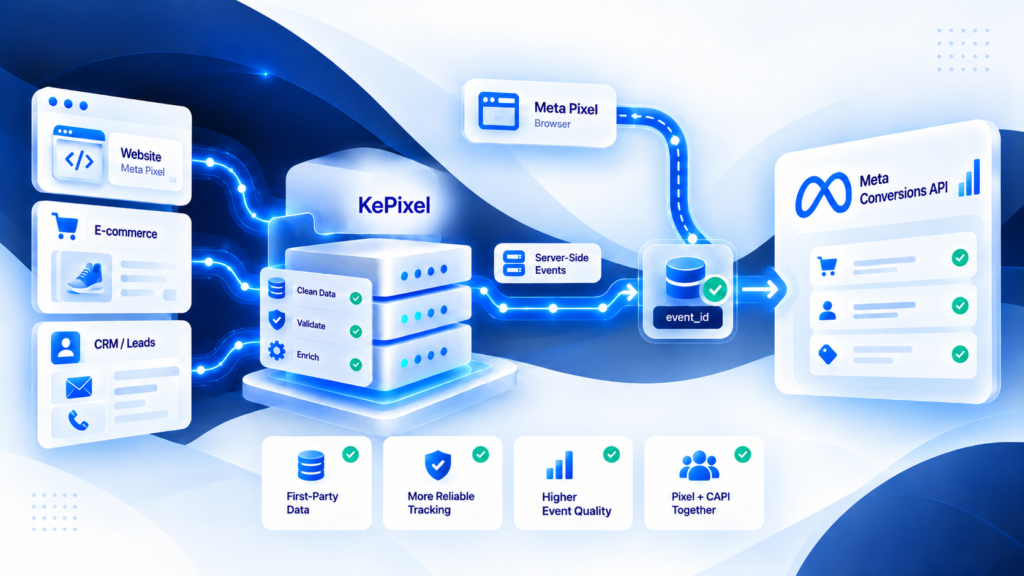
Meta Conversions API is a server-side event-delivery path for sending marketing events to Meta from a backend, commerce integration, server-side tagging layer, or other controlled system.
It can complement browser Pixel delivery, but it does not automatically replace Pixel, eliminate duplicates, improve Event Match Quality, or fix an incorrect Purchase event.
What problem Conversions API is meant to solve
Browser-only event delivery depends on code running in the customer's browser.
That environment can be affected by page transitions, implementation errors, blocked requests, identifier loss, consent state, or scripts competing with one another.
CAPI adds another route in which the event can be prepared and delivered from a server-side system.
The value of that route depends on the quality of the event entering it.
Where a CAPI event comes from
A server event still needs a trustworthy source.
For ecommerce, that source may be a real order or a commerce-system event. For leads, it may be a form, CRM, or backend state change.
Before sending anything to Meta, define:
- what business action the event represents;
- when the event becomes valid;
- which value and currency rules apply;
- which event or order identifiers are available;
- what permitted customer or click information exists;
- whether a browser copy of the same event is also sent.
A server connection should not invent business truth.
CAPI and Pixel are separate delivery paths
Pixel runs in the browser and is naturally close to page and session interactions.
CAPI sends events through a server-side route.
If both deliver the same Purchase, the implementation needs a deduplication strategy so one order is not interpreted as two logical conversions.
For a direct comparison, see Meta Pixel vs Meta Conversions API. For duplicate debugging, use Meta CAPI deduplication.
Five health checks for a CAPI implementation
Event coverage
Did the expected Purchase or Lead arrive at all?
Payload accuracy
Are event name, value, currency, and business identifiers correct?
Matching information
Does the event contain accurate, permitted information that Meta can use for matching where appropriate?
Deduplication
If browser and server copies exist, are they coordinated as one logical event?
Delivery diagnostics
Can the team see whether the event was sent, accepted, rejected, or retried?
A setup can pass one of these checks and fail the others.
What Conversions API does not guarantee
CAPI does not guarantee:
- more sales;
- lower acquisition cost;
- higher ROAS;
- perfect attribution;
- automatic deduplication;
- perfect Event Match Quality;
- recovery of an event that never existed at the source;
- removal of consent or privacy obligations.
Treat those as separate business or measurement outcomes.
Common implementation options
A team can reach a server-side delivery path through different architectures, such as a native commerce integration, server-side Tag Manager, custom backend code, or managed infrastructure.
The right choice depends on ownership, observability, maintenance capacity, and the measurement problem being solved.
Do not choose an implementation method only because it is labeled “server-side.”
How to validate CAPI with a real order
Use one real or controlled Purchase and trace it end to end:
- confirm the source order exists;
- confirm the Purchase event definition;
- check the browser event if Pixel is used;
- check the server event;
- compare event identity across the two paths;
- verify value and currency;
- inspect matching information separately;
- confirm Meta receives the event;
- reconcile the result with the source order.
Repeat across more than one checkout path before declaring the implementation healthy.
When a CAPI problem needs diagnosis, not another sender
A Tracking Health Audit is the current verified diagnostic offer for unclear conversion-tracking failures involving event quality, duplicates, delivery, or measurement discrepancies. This article does not claim that Meta destination delivery is generally available in KePixel.
If the failure point is unclear, request a Tracking Health Audit before changing the implementation. Current integration availability is confirmed separately.
Frequently Asked Questions
What is Meta Conversions API?
It is a server-side event-delivery mechanism for sending marketing events to Meta from a compatible server-side source or workflow.
Does CAPI replace Meta Pixel?
Not automatically. Pixel and CAPI can be used separately or together depending on the measurement architecture.
Does CAPI automatically deduplicate browser events?
No. When browser and server copies represent the same business event, the implementation still needs a deliberate event-identity and deduplication strategy.
Does CAPI guarantee better Event Match Quality?
No. Match quality depends on the accurate, permitted information available on the event; a server route alone does not guarantee it.
How do I know whether CAPI is working?
Validate the source event, payload, duplicate control, destination receipt, diagnostics, and reconciliation with real business outcomes.